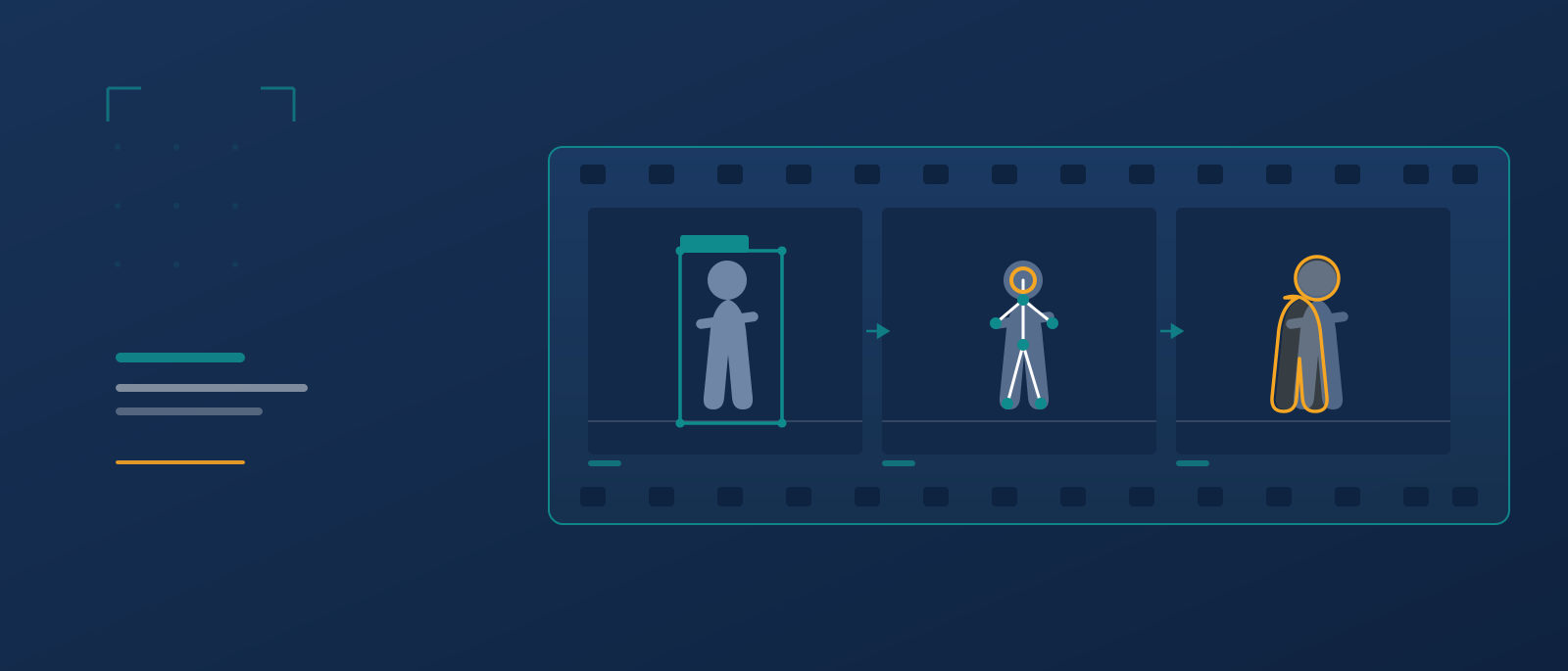
Video annotation is the process of labeling objects, actions, and events across the frames of a video so that machine learning models can recognize and track them over time. It is the difference between a model that sees a single still image and one that understands motion: where a car is heading, when a person reaches for a tool, or how a surgical instrument moves through a procedure. If image labeling teaches a model to see, labeling motion teaches it to follow.
This guide is written for machine learning leads, data operations managers, and founders who are scoping a computer vision project and need to decide how to get video labeled well, at a defensible cost, and at production quality. You will find the core techniques, a transparent cost breakdown, an original decision framework, and a practical checklist for choosing between doing it in-house and using professional video annotation services.
At a glance
| Question | Short answer |
|---|---|
| What is video annotation? | Labeling objects, actions, and events across video frames so models can detect and track them over time. |
| How is it different from image annotation? | It adds a time dimension: the same object must be tracked consistently across frames, and identities must persist through occlusion. |
| What are the main techniques? | Bounding boxes, 3D cuboids, polygons and polylines, keypoints and skeletons, and semantic or instance segmentation. |
| How much does it cost? | Commonly quoted at roughly USD 0.5 to 10 per video minute, or hourly rates of USD 3 to 60, depending on precision and domain (BasicAI, 2025). |
| In-house or outsourced? | In-house suits small, evolving pilots; managed video annotation services suit scale, edge cases, and audit requirements. |
| What decides quality? | Clear guidelines, consistent tracking across frames, inter-annotator agreement, and expert review against a gold-standard set. |
Table of contents
- What is video annotation
- Video annotation vs image annotation
- Why labeled video matters for AI
- Techniques and types
- Best video annotation tools
- How the annotation process works
- The Graveiens Video Annotation Complexity Matrix
- Services: in-house, freelance, or managed
- How much does it cost
- Across industries
- Real-world examples
- Common mistakes to avoid
- Quality control: how accuracy is built
- How to choose a partner
- Frequently asked questions
- About the authors
- Conclusion
What is video annotation
Video annotation is the practice of marking and labeling elements inside a video, frame by frame or across keyframes, to produce structured training data for computer vision models. Each object of interest receives a label and a shape, such as a box or a mask, and, crucially, a consistent identity that carries across frames. A pedestrian tagged in frame one is understood to be the same pedestrian in frame fifty, even after a passing bus briefly hides them.
That identity requirement is what separates it from still-image labeling. A short clip is not a handful of pictures; even a few seconds of 30 frames-per-second footage contains hundreds of frames. The task is not only to draw accurate shapes but to keep them coherent through motion, occlusion, lighting shifts, and changes in scale. Because this labeled motion is a specialized form of data annotation and labeling, the same quality disciplines apply, with an added temporal layer.
The practical payoff is temporal understanding. A model trained on well annotated video can learn trajectories, interactions, and the order in which events happen, which single frames cannot teach on their own. You will also see the same work called video labeling or video data annotation; the terms are used interchangeably in most computer vision annotation pipelines.
Video annotation vs image annotation
The core difference between video and image annotation is the dimension of time. Image annotation labels a single fixed frame, so each label stands alone. Video work adds motion: the same object must carry a stable identity across many frames, survive occlusion, and stay consistent as it changes scale and lighting.
| Factor | Image annotation | Video annotation |
|---|---|---|
| Unit of work | One static frame | A sequence of frames |
| Object identity | Independent per image | Must persist across frames |
| Efficiency method | None needed | Interpolation and tracking |
| Main challenge | Boundary accuracy | Temporal consistency |
| Typical volume | Hundreds of images | Thousands of frames per clip |
The practical takeaway is that video work is not simply image annotation repeated many times. The tracking requirement is what raises the labor, the skill, and the quality bar, which is also why video labeling usually costs more per delivered object than still-image work.
Why labeled video matters for AI
Labeled video matters because most real-world AI operates in motion, not in stills. Self-driving perception, robotics, sports analytics, surgical guidance, and retail behavior analysis all depend on models that reason about how a scene changes over time, and those models are only as good as the labeled sequences they learn from.
The market signal is clear. The data annotation tools market was valued at about USD 1.0 billion in 2023 and is projected to reach USD 5.3 billion by 2030, a compound annual growth rate of 26.3 percent, with the image and video segment expected to lead over the forecast period (Grand View Research, 2024, updated June 2026). As physical AI and computer vision move from research demos into deployed products, demand for accurately labeled video is rising with them.
There is a quieter reason too. Annotation quality sets a ceiling on model quality. If the tracking is inconsistent or the action boundaries are fuzzy, no amount of model tuning fully recovers the lost signal, which is why teams treat labeling as core infrastructure rather than a commodity step.
Video annotation techniques and types
The right technique depends on what the model must learn: where an object is, its exact shape, its pose, or the precise pixels it occupies. Most production pipelines combine several of the methods below.
The main techniques are:
- Bounding boxes: rectangles drawn around objects for detection and tracking. Fast and cheap, the default for counting and following vehicles, people, or products.
- 3D cuboids: boxes with depth, used when spatial position matters, such as estimating how far a car is from a sensor in ADAS and autonomous driving data.
- Polygons and polylines: multi-point shapes for irregular objects (a hand, an animal) and linear features (lane markings, road edges) that a rectangle cannot capture.
- Keypoints and skeletons: joints and landmarks placed on a body or object for pose estimation, common in sports, gesture, and robotics work.
- Semantic and instance segmentation: pixel-level labeling that classifies every pixel, used where exact boundaries matter, such as separating road from sidewalk.
Two efficiency methods sit alongside these. Keyframe interpolation lets an annotator label an object at intervals while the tool estimates its position in the frames between, and object tracking propagates a label forward automatically, with a human correcting drift. Both cut manual effort, but both require review, because an uncorrected interpolation error repeats across every frame it touches.
| Technique | Best for | Precision | Relative cost | Notes |
|---|---|---|---|---|
| Bounding box | Detection, tracking, counting | Low to medium | Lowest | Fast to place; weak on shape |
| 3D cuboid | Depth and spatial reasoning | Medium | Medium | Needs sensor context |
| Polygon / polyline | Irregular or linear objects | Medium to high | Medium to high | Slower per object |
| Keypoint / skeleton | Pose and motion | Medium to high | Medium | Guideline-sensitive |
| Segmentation | Exact pixel boundaries | Highest | Highest | Most labor-intensive |
The lesson from the comparison is that precision and cost move together. A common mistake is to over-specify: choosing pixel segmentation when a bounding box would train the model just as well, which multiplies cost with no accuracy gain in the deployed system.
Best video annotation tools
The tools below are the ones most computer vision teams evaluate first. There is no single best tool; the right choice depends on whether you want open-source control, a managed commercial platform, or a service partner that operates the tooling for you.
| Tool | Type | Best for |
|---|---|---|
| CVAT | Open source | Teams wanting free, self-hosted video labeling with interpolation and tracking |
| Label Studio | Open source | Flexible multi-format labeling across video, image, audio, and text |
| Labelbox | Commercial platform | Managing labeling workflows, review, and data operations at scale |
| Encord | Commercial platform | AI-assisted labeling, strong in medical and computer vision |
| V7 | Commercial platform | Automated labeling and model-assisted video workflows |
A tool is only half the picture. Open-source options such as CVAT remove license cost but shift the workforce, quality control, and project management onto your team. Commercial platforms add automation and review features but still need people to run them. Managed video annotation services sit above the tool layer: they can operate inside your chosen platform or their own, and they own the workforce and the quality process. Which layer you buy depends on where your bottleneck is, people or software.
How the annotation process works
A professional annotation workflow follows a repeatable path from raw footage to reviewed dataset. Understanding it helps you scope timelines and spot where quality is won or lost.
- Define the objective: specify the classes, the shapes, the tracking rules, and how edge cases are handled, all in a written guideline with visual examples.
- Prepare the footage: standardize frame rate, resolution, and sampling so annotators are not labeling redundant near-identical frames.
- Label keyframes and track: annotate at intervals, then interpolate or track objects through the frames between.
- Review and correct: a second pass checks tracking consistency, identity swaps, and boundary accuracy.
- Validate against a gold set: compare a sample to a known-correct reference to measure accuracy before delivery.
The step that teams most often underinvest in is the first one. Vague guidelines produce inconsistent labels that only surface during model training, when correcting them is far more expensive. Clear rules created before large-scale data collection and labeling begins are the cheapest quality investment available.
The Graveiens Video Annotation Complexity Matrix
To scope a project quickly, it helps to place it on two axes that drive nearly all of the cost and risk. The matrix maps temporal density (how much changes frame to frame) against label precision (how exact each shape must be). Where a project lands tells you which method, budget tier, and staffing model fit.
| Low label precision | High label precision | |
|---|---|---|
| Low temporal density | Quadrant 1: Simple tracking. Bounding boxes with interpolation. Lowest cost, good for retail counting and basic surveillance. | Quadrant 2: Precise stills-in-motion. Segmentation on sampled frames. Medical and inspection work where boundaries matter but scenes are slow. |
| High temporal density | Quadrant 3: Fast motion, coarse labels. Boxes and keypoints with heavy tracking review. Sports and crowd analysis. | Quadrant 4: Safety-critical sequences. Cuboids and segmentation with dense review and gold-set audits. Autonomous driving and robotics. |
The practical rule: cost and required expertise rise as you move toward Quadrant 4. A project there should never be staffed like a Quadrant 1 project. Most disappointing results come from treating a high-density, high-precision problem, such as robotics training data, with a workflow built for simple counting.
Video annotation services: in-house, freelance, or managed
The three common ways to get video labeled each win under different conditions, and the honest answer is that no single option is best for every team.
| Model | Best for | Strengths | Limitations |
|---|---|---|---|
| In-house team | Small, fast-changing pilots; sensitive data | Full control, tight feedback loop | Hard to scale; tooling and QA overhead |
| Freelance annotators | Short bursts, tight budgets | Low headline cost, flexible | Uneven quality; you own QA and management |
| Managed video annotation services | Scale, edge cases, audit needs | Trained workforce, built-in QA, domain reviewers | Higher headline rate; needs onboarding |
An in-house team is usually stronger early, when the labeling schema is still changing weekly and the volume is low. Freelance labor can make sense for a one-time burst, but the buyer absorbs all the quality-control and management cost, which is easy to underestimate. Professional video annotation services tend to win once volume, edge cases, or compliance requirements grow, because the quality system and the workforce already exist. A hybrid approach, keeping schema design in-house while outsourcing large-scale labeling, is common and often the most cost-effective. The trade-off is coordination overhead in exchange for scale and consistency.
How much does video annotation cost
There is no single video annotation cost, because pricing varies with the number of frames, the number of objects per frame, task complexity, the precision required, and how much quality assurance you build in. The same minute of footage can cost very different amounts depending on those five drivers. Video annotation is commonly priced per video minute, per frame, per labeled object, or per annotator hour. Published ranges put video work at roughly USD 0.5 to 10 per minute and annotation labor at about USD 3 to 60 per hour, with per-object image labels such as bounding boxes from USD 0.03 to 1.00 and segmentation masks from USD 0.05 to 5.00 (BasicAI, 2025). Domain expertise, precision, and turnaround urgency push figures toward the top of each range.
The illustrative calculation below shows how those variables compound. The numbers are an illustrative example built from published ranges, not a quote, and any real project should be scoped against your footage.
| Cost component | Illustrative assumption | Illustrative cost |
|---|---|---|
| Base labeling | 100 minutes of footage at USD 4 per minute | USD 400 |
| Quality review | 25 percent review overhead | USD 100 |
| Project management | 15 percent of labeling | USD 60 |
| Tooling or platform | Fixed allocation | USD 40 |
| Illustrative total | USD 600 |
Two points matter more than the exact figures. First, review and management are real line items, not free; a rate that omits them is not truly cheaper. Second, per-minute pricing hides complexity: a minute of dense, safety-critical segmentation is not the same product as a minute of sparse box tracking, so compare like for like.
Video annotation across industries
The same techniques are applied very differently depending on the domain, and the domain often dictates who should do the labeling.
In automotive and self-driving systems, labeled video supports pedestrian and vehicle detection, lane understanding, and driver monitoring, frequently fused with 3D and LiDAR data to automotive-grade standards. In healthcare, labeled surgical and endoscopy video helps models flag abnormalities and study technique, work that demands clinician-level reviewers rather than general labelers. In retail, tracking customer movement and stock supports layout and inventory decisions, usually a lower-precision, higher-volume task.
The fastest-moving frontier is physical AI. Teaching robots to manipulate objects relies on first-person, or egocentric, footage that captures hands, gaze, and intent. This is why egocentric video data collection has become a distinct discipline, with its own annotation demands around action boundaries and self-occlusion. For a fuller primer on the format, see the explainer on what egocentric video is. Related methods such as teleoperation generate their own annotated sequences for imitation learning.
Real-world examples
The two scenarios below are illustrative examples, not client results, chosen to show how the framework plays out in practice.
Illustrative example one: a warehouse robotics team needs to teach an arm to pick mixed items. The problem is that generic datasets do not match their bins. The decision is Quadrant 4 work, first-person capture with hand and object annotation and dense review. The expected outcome is a model that generalizes to their real workspace because the training footage came from it. This mirrors the broader question of how robots learn from demonstration.
Illustrative example two: a retail analytics startup wants footfall counts across 50 stores. The problem is budget, not precision. The decision is Quadrant 1 work, bounding boxes with interpolation and light sampling. The expected outcome is accurate counts at a fraction of the cost of segmentation, because the method was matched to the need rather than over-engineered.
Common mistakes to avoid
Certain errors recur across annotation teams, and each has a preventable root cause.
- Writing thin guidelines. It happens because teams rush to start labeling. It matters because ambiguous rules create inconsistent data that surfaces late. Prevent it by writing edge-case examples before volume labeling begins.
- Ignoring tracking consistency. It happens when reviewers check single frames, not sequences. It matters because identity swaps corrupt trajectory learning. Prevent it by reviewing objects across frames, not frame by frame.
- Over-specifying precision. It happens when segmentation is chosen by default. It matters because cost multiplies with no model gain. Prevent it by matching the technique to the deployed task.
- Trusting interpolation blindly. It happens because automation looks finished. It matters because one bad keyframe repeats across many. Prevent it by sampling interpolated frames in review.
- Skipping a gold-standard set. It happens when accuracy feels self-evident. It matters because you cannot measure what you do not benchmark. Prevent it by validating a sample against a known-correct reference.
Quality control: how accuracy is built
Quality in this work is engineered, not assumed. The most reliable pipelines run a staged review rather than a single pass. A common structure is a four-stage workflow: create, internal review, client review, and rework, measured against a gold-standard reference set. Each stage catches a different class of error, and the client review stage keeps the labeling aligned with how the model will actually be used.
A handful of concrete metrics anchor the process rather than gut feel. Intersection over Union, or IoU, measures how closely a drawn box or mask overlaps the ground truth, so it scores shape accuracy. ID switches count how often a tracked object is wrongly reassigned a new identity across frames, which is the clearest signal of broken temporal consistency. Inter-annotator agreement checks whether different people label the same footage the same way, exposing unclear guidelines. Gold-set accuracy compares sampled work to a trusted reference set to produce a hard, auditable number. Providers that combine domain-expert reviewers with this kind of staged QA target high post-review accuracy, with the exact threshold set by how safety-critical the application is. This same data validation discipline is what separates production-ready datasets from ones that merely look complete.
How to choose a labeling partner
Use this checklist to evaluate any video annotation provider or in-house plan before committing to volume.
- Confirm domain expertise: can reviewers judge your footage, whether it is medical, automotive, or robotics.
- Ask how tracking consistency is reviewed across frames, not just within them.
- Require a written quality process with defined review stages and a gold-standard set.
- Check the pricing model and confirm review and management are included, not extra.
- Run a small paid pilot before scaling, and measure accuracy against your own reference.
- Verify data consent, security, and audit trails, especially for footage of people.
- Confirm the workforce can scale to your volume without quality dropping.
A pay-for-approved-work pilot is the single best de-risking step: you see real accuracy on your data before making a large commitment, and you keep the leverage.
Frequently asked questions
What is video annotation in machine learning?
Video annotation in machine learning is labeling objects, actions, and events across the frames of a video so a model can detect and track them over time. Unlike image labeling, it requires each object to keep a consistent identity from frame to frame, even through occlusion and motion, so the model learns trajectories and interactions rather than isolated snapshots.
How is video annotation different from image annotation?
Image annotation labels a single static frame, while labeling video adds a time dimension. The same object must be tracked with a stable identity across many frames, and annotators use interpolation or tracking to stay efficient. Because a few seconds of footage contains hundreds of frames, video work is more labor-intensive and more sensitive to consistency errors than image work.
How much do video annotation services cost?
Published ranges commonly cite roughly USD 0.5 to 10 per video minute or USD 3 to 60 per annotator hour, with per-object image labels from about USD 0.03 for a bounding box (BasicAI, 2025). Price rises with precision, domain expertise, and turnaround speed. Always confirm whether quality review and project management are included in the rate, since they are real costs.
What are the main types of annotation?
The main types are bounding boxes, 3D cuboids, polygons and polylines, keypoints and skeletons, and semantic or instance segmentation. Efficiency methods such as keyframe interpolation and object tracking speed up labeling by propagating annotations across frames. The right mix depends on whether the model needs to know an object’s location, shape, pose, or exact pixels.
Is manual or automated annotation better?
Neither is universally better; the strongest pipelines are hybrid. Automated tracking and interpolation cut manual effort dramatically, but they drift and repeat errors across frames, so human review is essential. Fully manual labeling is accurate but slow and costly at scale. Automation with human correction, checked against a gold-standard set, usually gives the best balance of speed and accuracy.
How do I ensure video annotation quality?
Quality comes from clear written guidelines, staged review, inter-annotator agreement checks, and validation against a gold-standard set. Review objects across frames to catch identity swaps, not just single frames. Domain-expert reviewers matter for specialized footage. A staged workflow such as create, internal review, client review, and rework catches different error classes and keeps labels aligned with the model’s real use.
Should I build an in-house team or outsource labeling?
Build in-house when volume is low and the labeling schema is still changing, or when data is highly sensitive. Outsource to managed video annotation services when you need scale, edge-case coverage, or audit-ready compliance. Many teams use a hybrid model, designing the schema in-house and outsourcing large-scale labeling, which balances control with the ability to scale reliably.
Why does labeling matter for physical AI and robotics?
Physical AI systems learn from motion, and much of that learning relies on first-person, egocentric video that captures hands, gaze, and intent. Accurate action-boundary and object labeling directly caps how well a robot generalizes to real tasks. Poor annotation quality limits model quality no matter how good the algorithm is, which is why labeling is treated as core infrastructure in robotics work.
What tools are used for video annotation?
Common tools for this work include open-source options such as CVAT and Label Studio, and commercial platforms such as Labelbox, Encord, and V7. Open-source tools remove license cost but put the workforce and quality control on your team, while commercial platforms add automation and review features. Managed services can operate inside any of these tools and add the trained annotators and quality process on top.
What affects video annotation cost?
Video annotation cost depends on five main drivers: the number of frames, the number of objects labeled per frame, task complexity, the precision required, and the depth of quality assurance. A minute of dense, safety-critical segmentation costs far more than a minute of sparse bounding-box tracking. Pricing models include per minute, per frame, per object, and per annotator hour, so always compare like for like.
What is temporal consistency?
Temporal consistency means an annotated object keeps the same identity and accurate shape smoothly across every frame of a video, without flickering, drifting, or being reassigned a new identity. It is the quality that separates video annotation from labeling a series of unrelated images. Poor temporal consistency, often measured through ID switches, corrupts the trajectory data that motion models depend on.
What is the difference between video annotation and video labeling?
There is no meaningful difference: video annotation and video labeling refer to the same task of marking objects, actions, and events across video frames for machine learning. You may also see video data annotation used for the same work. The terms are interchangeable, though annotation is the more common phrasing in academic and computer vision contexts.
Conclusion
Video annotation is the labeling of objects, actions, and events across video frames so machine learning models can detect and track them over time, and getting it right is what turns raw footage into a model that understands motion. The most important decisions are not about tools but about fit: match the technique to what the model actually needs, place your project on the complexity matrix before you budget, and insist on staged review with a gold-standard benchmark. Precision and cost rise together, so over-engineering is as wasteful as under-investing in guidelines.
The lowest-risk way to test any provider is a small paid pilot on your own footage. Send a short representative clip, agree on the labels and the quality bar, and judge the result on real accuracy, IoU, and temporal consistency before you commit to volume. Graveiens AI runs exactly this kind of pay-for-approved-work pilot, with domain-expert reviewers and a four-stage QA process, so you only pay for labels that pass your review. Start a small video annotation pilot on a sample clip, or, if your work is first-person, begin with an egocentric video data collection pilot.
Sources
- Grand View Research, Data Annotation Tools Market Size, Share and Growth Report (2024, updated June 2026): https://www.grandviewresearch.com/industry-analysis/data-annotation-tools-market
- BasicAI, How Much Do Data Annotation Services Cost? The Complete Guide (2025): https://www.basic.ai/blog-post/how-much-do-data-annotation-services-cost-complete-guide-2025
- Graveiens AI, Data Annotation and Labeling: https://www.graveiensai.com/data-annotation
- Graveiens AI, What Is Egocentric Video: https://www.graveiensai.com/blog/what-is-egocentric-video/

Jitendra Choubay is the CEO & Founder of Graveiens AI, leading a human-in-the-loop data services team that helps AI builders with data collection, annotation, consent-backed voice data, transcription and LLM fine-tuning. He writes on building better, ethically sourced AI training data.
Get the next Graveiens AI article
Expert notes on AI data, annotation, LLMs and eLearning — no spam, unsubscribe anytime.
Need AI Development? Data Annotation? eLearning?
Talk to Graveiens AI about data collection, annotation, voice data, RLHF/SFT, LLM evaluation and AI training data — invoiced only on approved work.
Contact Graveiens AI